
Persistent memory
Persistent memory is the core of Neuronz.ai: a durable store of facts, one clear fact per entry, that your agents carry from one session to the next within the same profile.
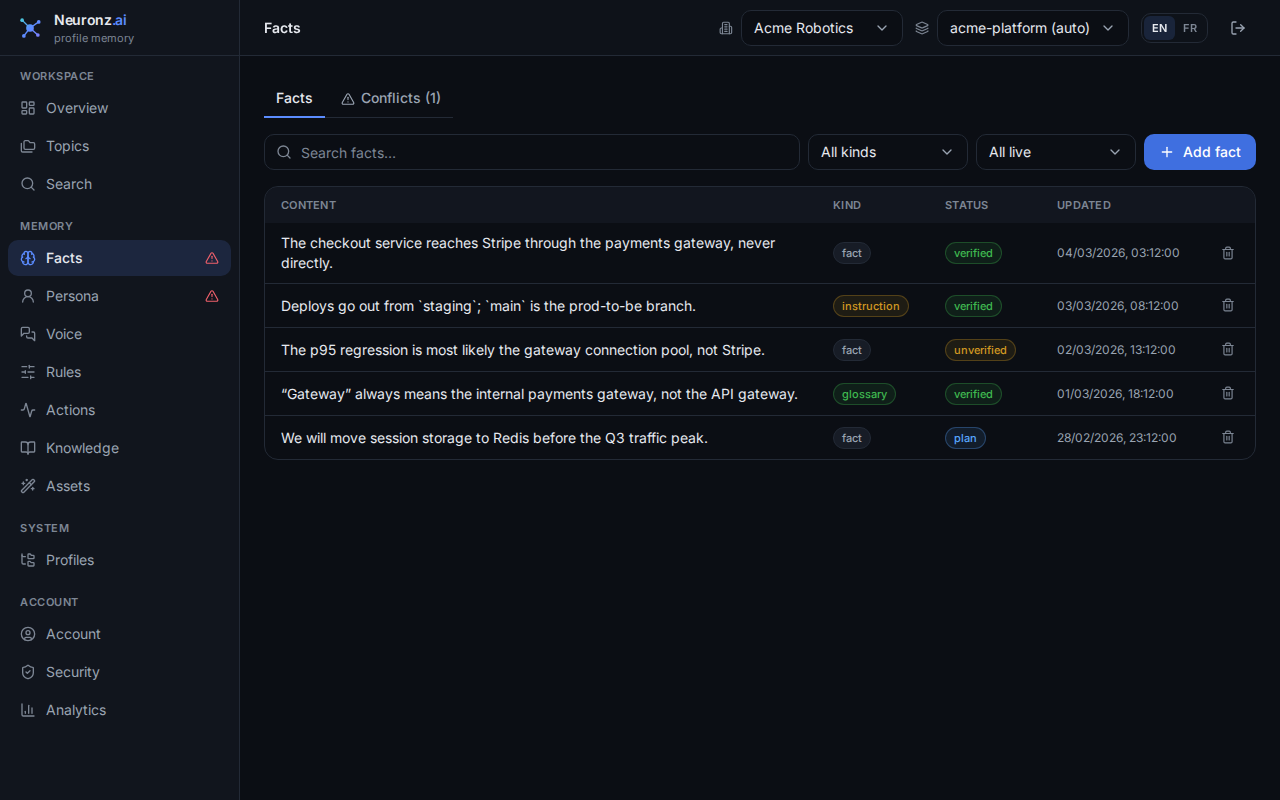
The Facts view: every fact your agents have learned, each tagged with its kind and status. You can search, filter and edit them.
How it works
One fact per entry. Each entry holds a single, self-contained fact, tagged by kind: a plain fact, an entity (a person, service, or system), a glossary term, an instruction, a persona trait, or other. Facts belong to a profile, and other profiles never see them. Small entries let recall return exactly the fact a prompt needs instead of a whole document. A claim the agent hasn't confirmed yet is stored as unverified until something settles it, so memory doesn't fill with guesses presented as facts.
No duplicates. Every new fact is checked against what's already there. If similar facts exist, your agent is shown them (see Similar facts) and keeps the existing entry, replaces it, or flags a contradiction; if the fact is new, it's simply added.
History is kept. Correcting a fact doesn't erase the old one: the previous version is marked as superseded and the new one becomes active, so you can see how a fact changed. Deleting a fact retires it rather than destroying the record.
Contradictions are caught. When your agent finds that a new fact conflicts with an existing one and the conversation doesn't show which is right, both are marked disputed and drop out of recall until you settle them.
Settling contradictions
Each contradiction is a pair: the two facts that disagree. If a third fact later disagrees with one of them, it opens its own separate pair, so settling one pair settles only those two facts. Check the list for others rather than assuming the subject is clear.
Open contradictions are listed in the Conflicts tab of the dashboard's Facts page, and a warning icon beside Facts shows how many are open. Contradictions between two persona traits appear on the Persona page instead. Settling one takes a single answer:
- One of these is true. That fact returns to
verifiedand rejoins recall; the other is retired (its history is kept). - None of these is true. Both are retired and nothing replaces them.
- None is true, here is what is. Both are retired and your correction is stored as a new verified fact.
- Not now. The question is put off, not answered, and comes back later.
Your agent can do the same from the chat with list_conflicts and resolve_conflict.
Similar facts
When your agent saves a fact and the profile already holds live facts that say almost the same thing, the save answer lists them. The agent reads the ones that matter and settles each with fact_resolve — it is a duplicate (the new fact is dropped), it replaces the old one, or the two contradict each other (they are held out of recall until settled, see above). Nothing is decided for the agent, and finding similar facts costs no reranking. The similarity threshold is the fact_neighbor_floor setting (default 0.80) in the dashboard's Settings.
Using it
Memory is captured automatically as you work, through self-consolidation and, in Claude Code, detached capture. You can also save a fact directly by asking your agent to remember it ("remember that retries are capped at 3 with exponential backoff and jitter"); it saves it with fact_add.
Your agent reaches memory through these MCP tools: fact_add, fact_resolve, fact_search, fact_get, fact_list, fact_update, fact_delete, plus list_conflicts and resolve_conflict. You can also read, edit and curate facts on the Facts page of the dashboard.
Related
- Auto-recall — how facts are found at the right moment.
- Rules — rules your agent must follow, which only you can approve.
- Personas & the social map — the persona kind, about you or a colleague.
- The knowledge graph — linking facts to the evidence behind them.